May 03, 2026 · AI
Stop Automating. Start Redesigning.
AI creates the most value when we change the shape of the work, not just the speed of the task. A look at why automation preserves old workflows, how AI exposes weak work design, and what redesign actually looks like in software delivery.
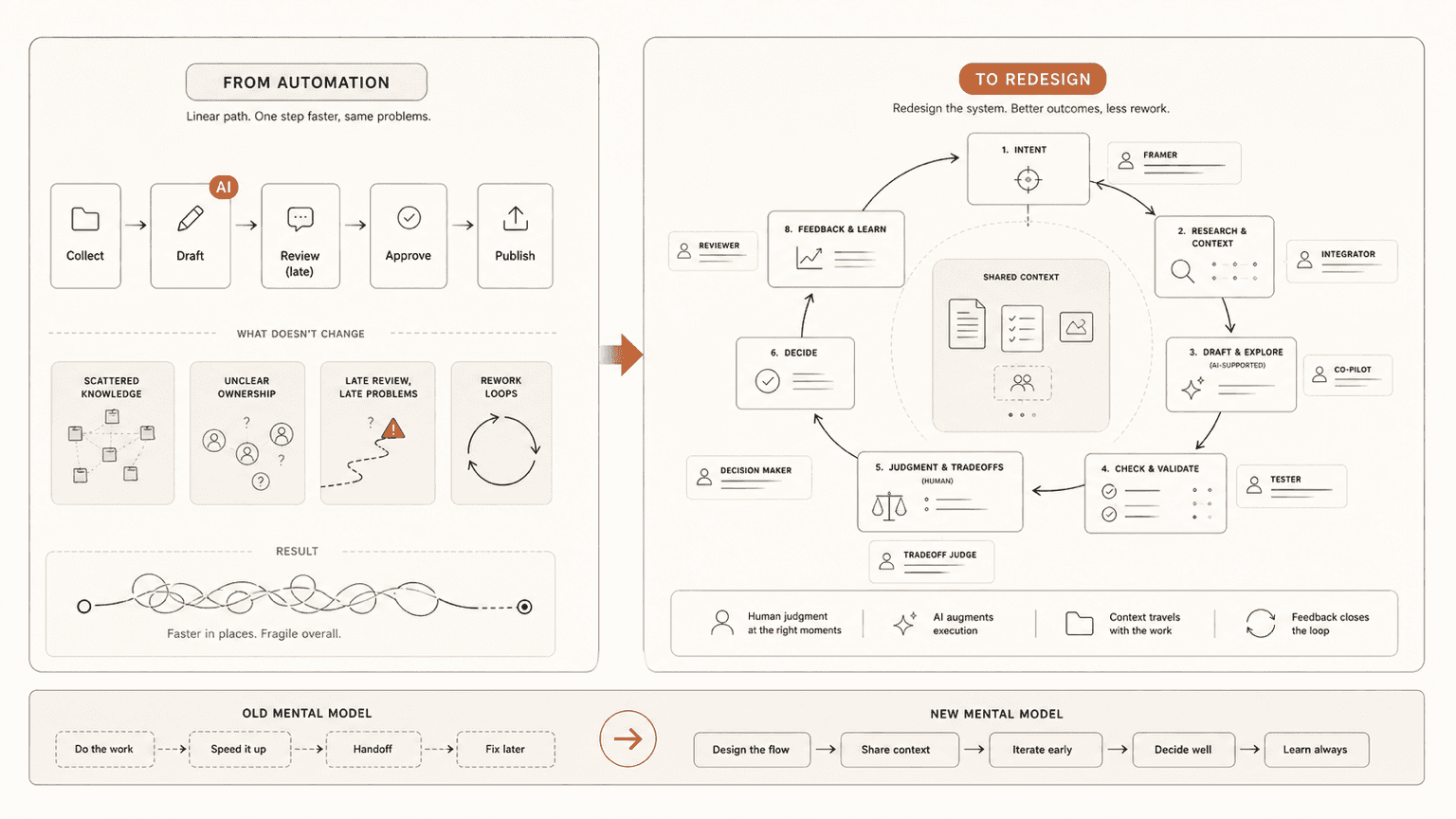
The easy version of AI adoption is adding tools to existing work
The easiest version of AI adoption is giving people tools and asking them to use them.
That is usually where organisations start, and it is not wrong. People need access. They need to experiment. They need to see what the tools are good at and where they fall over. In software teams, that might mean coding assistants, chat interfaces, meeting summaries, document drafting, research support, test generation, or help explaining unfamiliar code.
The problem is what happens next.
A team gets access to AI, usage goes up, a few good examples circulate, and it starts to feel like progress. Someone writes a better first draft. Someone generates test cases faster. Someone summarises a customer call. Someone gets help debugging a script. All useful.
But the work itself often stays the same.
The same meetings happen. The same handoffs remain. The same unclear requirements move downstream. The same knowledge gaps slow people down. The same approval steps exist because nobody has asked whether they still make sense. The same rework appears later, only now some of it arrives faster and better formatted.
This is where AI adoption can become tool usage theatre.
The organisation can look busier with AI without becoming much better at the work.
Automation is useful, but it preserves the old shape
I do not think automation is bad. Sometimes automation is exactly the right answer.
If a task is stable, repetitive, well-understood, low-risk, and already part of a healthy workflow, automating it can be a clean win. Nobody needs a philosophical redesign of a weekly report if the report is useful, the data is trusted, and the format is stable. Automate it and move on.
The mistake is treating every AI opportunity that way.
Automation usually preserves the shape of the existing system. It asks, "How can we do this step faster?" That is a useful question, but it is not the only question. In strained teams, it is often not the best first question.
A lot of work is slow because the workflow is poorly shaped. Knowledge is scattered. Decisions are unclear. Handoffs are brittle. Quality checks happen too late. Teams wait for information that should have been available earlier. People create documents that nobody trusts, read, or maintains.
In that kind of system, automating a step can help, but it can also make the dysfunction move faster.
You get more output than judgment can absorb.
The better question is: why is the work shaped this way?
Before applying AI to a task, I think teams should pause and ask a more basic question:
Why is the work shaped this way in the first place?
That sounds simple, but it changes the conversation.
Instead of asking, "Can AI write this document faster?" ask why the document exists, who uses it, what decision it supports, where the inputs come from, and what usually goes wrong.
Instead of asking, "Can AI generate code from this ticket?" ask whether the ticket is clear, whether the requirements are testable, whether the codebase context is available, whether the review process can catch the right failure modes, and whether the team agrees what good looks like.
Instead of asking, "Can AI summarise this meeting?" ask why the meeting exists, what decision it is meant to produce, and whether the right knowledge was available before the meeting started.
AI is powerful because it changes constraints. It changes the cost of drafting, summarising, searching, comparing, prototyping, checking, and translating between formats. Once those costs change, some old steps may no longer need to exist in the same form.
That is the redesign opportunity.
AI exposes weak work design
In the contexts I have worked around, especially smaller software businesses with overloaded teams, legacy products, and real delivery pressure, AI does not magically clean up messy work.
It often exposes it.
If documentation is poor, AI struggles to give reliable answers. If tickets are vague, AI can produce confident but misdirected work. If testing is weak, AI can create more code than the team can safely assess. If ownership is unclear, AI output has nowhere sensible to land. If product thinking is shallow, AI can produce more features without improving the product.
This is why demos can be misleading.
A demo usually happens in a clean slice of work. The prompt is clear. The task is bounded. The context is curated. The output appears quickly. It feels like the future has arrived.
Then the same tool lands inside a real team, where context is scattered across tickets, code, Slack threads, customer calls, tribal knowledge, old decisions, inconsistent documentation, and the heads of three busy people.
The tool is not useless. Far from it. But the work system around the tool becomes the limiting factor.
That is why knowledge systems matter. That is why review loops matter. That is why workflow mapping matters. That is why "just use AI more" is too thin as a transformation plan.
The human role does not disappear; it moves
One of the lazy arguments about AI is that humans either do the work or AI does the work.
That is not how the useful versions tend to work.
As AI takes on more drafting, generation, search, summarisation, and translation, the human role moves. People spend less time producing every first version manually and more time framing the problem, judging the output, integrating context, testing assumptions, choosing trade-offs, and deciding what should be done at all.
That is a higher bar, not a lower one.
This is where I keep coming back to the idea of Thinking Altitude. If AI makes it easier to produce answers, then the scarce capability becomes the quality of the question, the frame, the review, and the decision. Better tools do not remove the need for judgment. They punish weak judgment faster.
There is a cognitive atrophy risk here too.
I think of it like GPS versus learning the map. GPS is useful. I use it. But if I never build an internal sense of direction, I become dependent in a way that quietly weakens me. AI can do the same thing. Used well, it strengthens thinking. Used poorly, it makes people faster and weaker at the same time.
So the redesign question is not just "which parts should AI do?"
It is also "which human capabilities must get stronger because AI is now in the system?"
Human-in-the-loop is not human-as-rubber-stamp
A lot of AI process designs say "human-in-the-loop" as if that solves the hard part.
It does not.
A human clicking approve at the end of a process they did not shape, cannot inspect properly, and do not have time to challenge is not meaningful oversight. That is human-as-rubber-stamp.
A real human-in-the-loop design is more specific. It says where human judgment matters and why.
Maybe the human frames the task before AI touches it. Maybe they choose the source material. Maybe they inspect high-risk claims. Maybe they review code paths that affect security, privacy, billing, or data integrity. Maybe they compare alternatives rather than accept one generated answer. Maybe they decide when the AI output is good enough, when it needs more work, and when it should be ignored.
The point is not to keep humans involved for ceremony.
The point is to protect the parts of the work where accountability, judgment, taste, context, ethics, customer understanding, or system knowledge matter.
That means workflow redesign has to include human decision design. Otherwise the team may produce more AI-assisted work while slowly weakening the very expertise needed to judge it.
Software delivery is where the difference becomes obvious
Software delivery is a good place to see the gap between automation and redesign.
The shallow version of AI in software teams is "AI writes code faster." That is useful, but incomplete. Writing code is only one part of delivery. In many teams I have seen, the harder problems sit around the code: discovery, requirements, decomposition, architecture, review, testing, release confidence, documentation, and feedback from customers.
If AI only speeds up coding, it may create more downstream pressure.
More code needs more review. More change needs better tests. Faster implementation needs clearer product judgment. If the team does not improve those surrounding systems, AI-assisted coding can become a local speed boost that creates system-level congestion.
The deeper opportunity is to redesign the software delivery loop.
For example, before work starts, AI can help turn messy discovery material into clearer options, assumptions, risks, and acceptance criteria. During planning, it can help decompose work, identify dependencies, and draft test scenarios. During implementation, it can help with code, but also with explanations of unfamiliar areas, migration plans, refactoring options, and edge cases. During review, it can support checklists, threat modelling, test gap analysis, and documentation updates. After release, it can help summarise feedback, incidents, and usage patterns into the next planning loop.
That is closer to what I mean by AI-first delivery.
Not "let AI write everything." Not "replace engineers." Not "skip thinking."
It means redesigning the flow so AI supports the whole lifecycle, while humans become more deliberate about framing, review, judgment, and accountability.
Tool usage is not fluency
This is one of the things I think leaders need to be careful about.
AI access is not AI adoption. AI usage is not AI fluency.
A developer using a coding assistant every day may still be using it shallowly. A product manager generating user stories faster may still be producing weak product thinking. A leader summarising documents with AI may still avoid the harder work of making decisions.
Real fluency shows up in the work changing.
Can people use AI to clarify ambiguous problems? Can they check their assumptions? Can they compare options more rigorously? Can they improve quality without creating review overload? Can they explain where AI helped, where it was wrong, and what human judgment they applied?
Those are stronger signals than raw usage.
This is why I like separating tool access, tool usage, and capability. Access is necessary. Usage is evidence of experimentation. Capability is the part that matters.
Capability means the person and the workflow are both getting better.
Redesign starts small
The word redesign can sound too grand.
It does not have to mean a massive transformation program. In overloaded teams, it probably should not start there.
Start with one recurring workflow. Something real enough to matter, but contained enough to understand. A bug triage process. A release note process. A customer feedback review. A support-to-product handoff. A small feature discovery process. A test planning workflow. A code review loop.
Map what actually happens, not what the process document says happens.
Where does the work start? Who touches it? Where does it wait? Where does knowledge go missing? Where does rework appear? Where are decisions made? Which steps exist because of old constraints? Which parts require real judgment? Which parts are repetitive enough to automate safely?
Then ask what AI changes.
Maybe it removes a drafting bottleneck. Maybe it makes scattered knowledge searchable. Maybe it lets the team compare options earlier. Maybe it improves test coverage. Maybe it reduces handoff loss. Maybe it lets a person review more thoroughly because the first pass is prepared for them.
The practical move is to redesign before automating by default.
What to try on Monday
Pick one workflow your team repeats often enough that everyone recognises it.
Not the biggest one. Not the most political one. One that is annoying, visible, and small enough to inspect.
Then work through this:
Write down the actual steps.
Mark every handoff, wait, rework loop, and unclear decision.
Mark where human judgment genuinely matters.
Mark where the work is repetitive, stable, and low-risk.
Ask which old constraints AI changes.
Remove, combine, or reshape steps before automating them.
Decide how you will know whether the redesigned flow is better.
The last step matters. "People used AI" is not enough.
Did the cycle time improve? Did quality improve? Did rework drop? Did people make better decisions earlier? Did the team reduce waiting, confusion, or duplicated effort? Did human review become stronger rather than thinner?
Those are the questions that tell you whether AI changed the work or merely decorated it.
The real question is not "what can AI do?"
"What can AI do?" is an understandable question. It is also too broad to be useful for long.
The better question is more specific:
Now that AI can do more of the work, what should the work become?
That question forces a different kind of thinking. It moves the conversation from tools to workflows, from usage to capability, from output to judgment, from automation to redesign.
Sometimes the answer will still be automation. Good. Automate the stable thing and save people the time.
But in the places where work is slow because it is poorly shaped, unclear, handoff-heavy, knowledge-poor, or judgment-light, AI gives us a better opportunity than speed.
It gives us a reason to redesign the work.
And that is where the real value starts to show up.
This post is drawn from my work and thinking around AI adoption, software delivery, and team capability. It reflects personal analysis and public learning, not a company position or professional advice.